One-point lessons (OPL) with QR codes: a step-by-step guide for the shop floor
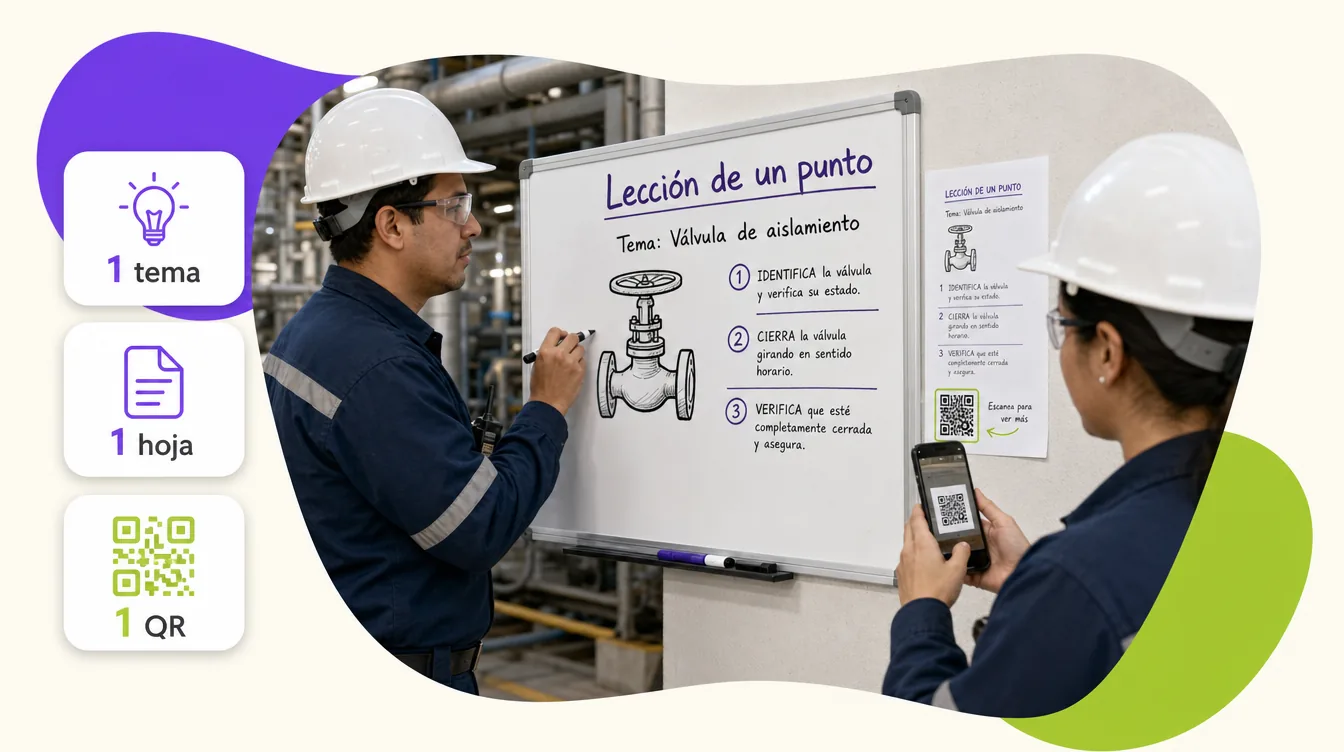
The one-point lesson (OPL) is the most widely used training format in TPM and Lean plants: one sheet, one topic, one drawing and three to five steps. This guide explains how to write a good one and how to turn it into a video microcapsule opened by a QR code stuck on the machine, so the lesson is consulted at the workstation and not in the binder.
In this article
- What is a one-point lesson?
- How to write a one-point lesson in six steps
- From the sheet to the QR code: the one-point lesson on video
- Script for a 90-second microcapsule
- The QR code: dynamic and tough
- Where to place the QR code
- Tracking: the part the sheet never had
- Common mistakes when implementing one-point lessons
- Want to bring this to your team?
What is a one-point lesson?
A one-point lesson (OPL) is a one-sheet visual work instruction that teaches a single topic: how to clean a filter, how to check pressure before start-up, what to do if the guard is open. It was born in Japanese Total Productive Maintenance (TPM) and today automotive, food and auto-parts plants across Mexico use it as the minimum unit of workstation training.
There are three kinds: basic knowledge (how something works or is done), problem (a real defect or failure, its cause and how to prevent it from coming back) and improvement (a change an operator proposed that is now the standard). All three share the golden rule: one sheet, one topic, five minutes of explanation.
How to write a one-point lesson in six steps
- Pick a single topic that causes errors. Not "sealer operation" but "how to adjust the sealer temperature when changing material". If you need two sheets, you have two lessons.
- Write the objective in one line. "At the end, the operator sets the correct temperature without asking the supervisor".
- Draw or photograph the exact point. A photo with an arrow beats three paragraphs; mark what is wrong in red and what is right in green.
- Number three to five steps with imperative verbs: "Switch off", "Check", "Turn to the stop". No "the operator shall proceed to".
- Add a check question. "What temperature for 40-micron film?". If the operator answers it, the lesson worked.
- Add version, date, author and approver. It is a controlled document; without that, the plant ends up with three different versions stuck on three machines.
From the sheet to the QR code: the one-point lesson on video
The OPL sheet has a limit: it does not show movement. "Turn to the stop" is understood in thirty seconds of video and misread in a photo. That is why more and more plants film the lesson with a phone, turn it into a one-to-three-minute microcapsule and stick a QR code on the machine that opens it. The printed sheet stays (it is the quick reference) and the QR goes inside it.
Script for a 90-second microcapsule
Ten seconds of context (which machine, which step and why it matters), sixty seconds of step-by-step execution by the operator who does it best, ten seconds on the most frequent mistake and what happens if it is made, and ten seconds to close with the check question. Film horizontally, phone on a tripod, microphone as close as possible; if the plant is noisy, subtitles are mandatory.
The QR code: dynamic and tough
Use dynamic QR codes: the code points to an intermediate address you control, so when the lesson changes you update the video without reprinting or peeling anything. Print it on a polyester or laminated vinyl label (it withstands grease, water and solvents) at least 4 × 4 cm with the text "Scan to watch the procedure" and the topic name underneath: a code without a label is a mystery nobody scans.
Where to place the QR code
| Point | Where the QR goes | Which lesson it opens |
|---|---|---|
| Machine or equipment | Next to the control panel, at eye level | Start-up, adjustments, cleaning and what to do on failure |
| Workstation | On the visual aid or the station board | Current work instruction and pre-start checks |
| Hazard zone | On the area safety sign | PPE, lockout-tagout, emergency |
| Printed OPL sheet | In the bottom corner of the sheet | The same lesson on video with the check question |
Tracking: the part the sheet never had
When the lesson lives behind a QR code, every scan can be recorded: who consulted it, when, from which machine and whether they answered the check question correctly. That turns the OPL into training evidence for the STPS training plan and into a thermometer for the plant: if the sealer capsule is consulted twenty times a week, that standard needs a review or guided practice. With a QR code training system at the workstation tracking is automatic; without one, at least note on the sheet who received the lesson and when.
Common mistakes when implementing one-point lessons
- Two-sided sheets with ten steps: that is a procedure, not an OPL.
- Lessons written by engineering without the operator: the language is not the line's and nobody reads them.
- Static QR codes pointing to a file on an internal server: they do not open from the operator's phone.
- Forgetting the version: the plant ends up with three versions of the same adjustment on three machines.
- Not measuring: without lookup tracking you do not know which lessons work or which are missing.
If you would rather do it with us, with QR Capsules we walk your plant, film the lessons with your people and leave the codes in place with tracking running; existing manuals are converted with our AI course creation from manuals. And if your question is whether QR or the binder is better, read QR code versus procedures binder.
Want to bring this to your team?
One-point lessons with QR codes are filmed at your plant in a few weeks. Message us on WhatsApp, fill out the contact form or open this site's live chat: we send a proposal with three scope options and a closed price in under 24 business hours, with the DC-3 certificate and Geedle Bot included. The full program is at QR code training at the workstation and the catalog at training courses for companies.