

Meta Pixel Saltar al contenido
Logo Geedle
Moodle plugin · Learning paths

Learning path for Moodle

A Moodle plugin that turns your course catalog into learning paths: training tracks by role, department, or program where each person sees their full track, how far they've come, and what their next step is — no Moodle Workplace needed.

Personalized learning path with course unlocking, badges, supervision, AI-powered notifications, and an achievement showcase

What is a learning path in Moodle?

A learning path in Moodle is an ordered sequence of courses with its own name — onboarding, role ladder, annual certification — assigned to individuals, groups, or cohorts. In corporate training it is also called a training track. Unlike a loose catalog, the path tells each learner what they completed, where they are, and what's next, and gives the admin everyone's progress in a single report. It is how you organize online learning once the company has dozens of courses and needs each role to go through only its own, in the right order.

Benefits of learning paths for companies

What changes when online training stops being a list of courses and becomes a track by role.

  • Onboarding that runs itself

    New hires get their training track on day one and courses arrive in order — no emails, no manual reminders.

  • Measurable compliance

    The percentage of the workforce current on mandatory training, by role — the number leadership and audits ask for.

  • Evidence for the STPS

    Exportable progress, dates, and grades to back your DC-3 certificates before Mexico's labor authority.

  • Visible growth

    Every employee knows which courses they need for their next role: the career ladder stops being a promise.

  • Less admin work

    Assign a path to an entire cohort instead of enrolling course by course and person by person.

  • Better online learning

    A clear path reduces drop-off: people know how much is left and finish what they start.

Use cases: paths by role, department, or program

The same mechanic solves the three training tracks we see most in companies.

Program paths: onboarding

Program paths: onboarding

The welcome program arrives on day one and nobody has to chase new hires: courses unlock in order and their progress is on record.

Role paths: career ladder

Role paths: career ladder

Every role has its sequence — operator, supervisor, area lead — and employees know exactly what they need to move up.

Department paths: annual compliance

Department paths: annual compliance

Safety, quality, or NOM-035 by department, in a path that resets each year with the "workforce up to date" report always available.

Learning paths vs. individual courses

The same courses, two ways to deliver them. The difference is what learners see and what the company can measure.

Learning pathIndividual courses
What it isA named, ordered track: several courses taken as a single path.Loose courses in a catalog, each with its own enrollment.
What learners seeThe full map: what they finished, where they are, and their next step.Only the current course; they don't know what's next or how much is left.
How it is assignedOnce, to an individual, group, or cohort; courses arrive in sequence.Course by course and person by person.
OrderDefined by the path; the next course unlocks when the previous one is done.Free, or chained with prerequisites learners can't see.
What the company measuresProgress by person, path, and cohort, plus the % of the workforce up to date by role.Completion per course; compliance by role is assembled by hand.
When it fitsOnboarding, role ladders, annual compliance, development programs.Standalone topics, optional courses, or one-off training.
Moodle Workplace

How to set up learning paths in Moodle Workplace

Step 1

Create the program

In Site administration > Learning > Programs, create the program with a name, description, and image: that program is your path.

Step 2

Build the content

Add courses in sets and choose how they are completed: all in order, in any order, or at least a number of courses.

Step 3

Set the schedule

Set availability and due dates, which can be relative to the date each person is allocated.

Paso 4

Allocate and automate

Allocate manually or with dynamic rules by role or department; if it repeats yearly, link it to a certification.


01

What if your company runs Moodle LMS, not Workplace?

Moodle Workplace ships native paths as Programs, but it is a licensed edition contracted through a Moodle partner. Most companies run Moodle LMS, the open-source edition, where the closest thing is prerequisites and course completion: they chain courses, but they don't show the map or report progress per path. Our plugin closes that gap and brings learning paths to your current Moodle, with no migration and no license change. If you need paths built from a role analysis, we handle it with our competency-based instructional design service.

02

How to implement learning paths in your company

Start with roles, not courses: define what each role must master, group the courses you already have into tracks, and spot the missing ones. Then assign paths by cohort, measure compliance, and adjust. We walk through it step by step in the guide how to implement learning paths in Moodle, and our free training templates include formats to map roles and courses.

How to set up a path with our plugin in Moodle LMS

From a messy course catalog to clear tracks by role — without touching code.

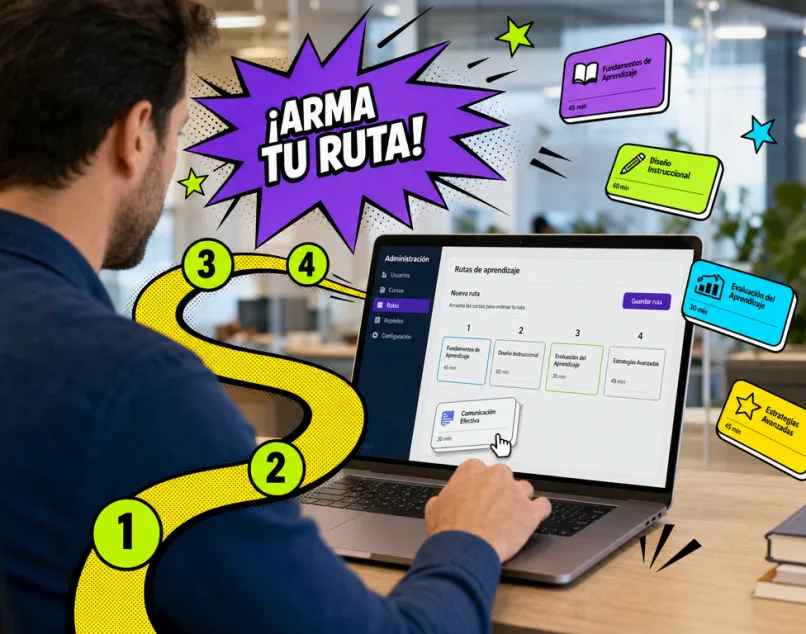
Build the path

Select the courses in the right order and give the path a name: "Onboarding", "Line Supervisor", "Annual Certification". Create as many as you need and reuse courses across paths.

Building a learning path by dragging courses into sequence

Assign it to individuals, groups, or cohorts

A path can go to one person, a team, or an entire new-hire cohort. Everyone sees it on their dashboard with their own progress — and one person can carry several paths at once.

Employee viewing her learning path at 60% progress

Track compliance in real time

The report shows progress by person, by path, and by cohort — plus the percentage of the workforce up to date by role that leadership and audits ask for. Exportable and ready to back your DC-3 certificates.

On-screen training compliance report by role

Automate progress and reward it

  • With rules and alerts, enrollment in the next course is automatic
  • With the avatar gamification plugin, every milestone earns points and coins
  • Learners keep advancing without anyone pushing them
  • That's what a corporate university that runs itself looks like
Gamified Moodle dashboard with avatars, points, and coins

The number leadership asks for — always available

What changes when training stops being a loose list of courses.

Compliance visibility by role

100 %

100%

You know at any moment what percentage of the workforce is current on mandatory training.

Of their progress visible to learners

100 %

100%

Every employee sees their full map: what they finished, where they are, and what's next — without asking.

Reviews

What teams already training with Geedle say

"Learning paths gave us the number leadership wanted: % of workforce up to date by role."

Karla

Karla

Talent Manager

"New hires get their path on day one. Onboarding no longer depends on emails."

Daniela

Daniela

Platform Admin

"The role ladder is finally visible: people know what they need to move up."

Luis

Luis

Corporate University

"The exportable compliance report saved us days of audit prep."

Roberto

Roberto

IT Lead

FAQ

Frequently asked questions

Shall we map your company's first path?

Book a demo and we'll build it with your real courses — you'll see it running in under an hour.