Automatic onboarding
When an employee is added to the "New hires" cohort, they are enrolled in the 4 welcome courses and receive a message with their training calendar.

Platforms
Course production
Online course production
From content to SCORM, in your city
Instructional design for courses
Objectives, script and storyboard
Course content design
Writing, scripts and graphic design
Gamified courses
End-to-end SCORM production
Interactive videos
Decisions and assessment in video
Learning objects
Interactive micro-content
Moodle Plugins
Artificial intelligence
ISO 9001 — Quality
ISO 14001 — Environmental
ISO 45001 — Safety
ISO services
Formats
Learn
A notifications agent that works for you inside Moodle, the open-source LMS: set up "if this happens, do that" rules and the system sends automatic messages to students and teachers, enrolls them in courses, assigns activities, and issues certificates — on its own, on time, and without anyone having to remember.



HR, quality and L&D teams
already train with Geedle.


It is a plugin for Moodle — the open-source LMS most widely used by schools, universities, and companies — that watches what happens in your courses and, when a condition is met, sends automated notifications and runs actions for you. Instead of checking reports and sending reminders by hand, you define the rule once and the agent applies it to all your students, every day.
Any condition chains with any action — and a single rule can send severper monthsages and run several actions at once.
Message templates with the student's name, course, and due date — by email or Moodle internper monthsaging, to the student, their teacher, or their manager.
Days without logging in or without progressing in a course: the agent writes to the learner who is falling behind before they drop out.
Course or activity completed, minimum grade reached or failed: the trigger for recognition or for a refresher.
Upcoming or past due date, cohort, group, or profile fields — for compliance and to target who receives each message.
Automatic enrollment or unenrollment, assignment of refresher activities, certificate issuing, and group or cohort changes.
Every rule records what it did, when, and to whom; before activating it you test it in simulation, without sending a single reper monthsage.
Because communication that depends on someone remembering fails. These are the reasons we hear most from people who already use it.
Inactive learners get a message in time, not after they have already failed. Online training stops depending on the tutor's memory.
Reminders, enrollments, and certificates that used to be manual work are configured once and run on their own forever.
Every student gets the same message at the same moment, with their name and course — no forgetting, no favoritism.
Expiration notices are logged: you know who was notified and when, ready for an audit.
For anyone running a Moodle platform who wants communication with learners to happen on its own.

They stop chasing pending tasks: rules enroll, notify, and certify while they focus on what matters.

They send follow-up messages to their students without writing them one by one, and find out in time who is falling behind.

Corporate universities and training departments that need compliance, expiration reminders, and evidence per employee.
Moodle already announces some events on its own. The difference is who decides what gets sent, to whom, and what happens next.
| Moodle native notifications | Geedle notifications agent | |
|---|---|---|
| What triggers the alert | System events: submissions, forum posts, released grades. | The conditions you define: inactivity, progress, grades, dates, cohort, or group. |
| Message content | Generic system text. | Templates with the student's name, course, and dates. |
| Who receives it | The person involved in the event. | The student, their teacher or tutor, their manager, or several at once. |
| What happens next | Nothing: the alert is the end. | Chained actions: enroll, assign refreshers, issue certificates, move groups. |
| Record | No per-rule log. | Auditable log of every run, plus simulation mode. |
When an employee is added to the "New hires" cohort, they are enrolled in the 4 welcome courses and receive a message with their training calendar.
15 days before their annual certification expires, the employee and their manager are notified; if they don't renew, the agent reassigns the course and notifies them again.
When someone passes with 90 or more, the certificate is issued on the spot and the student gets a congratulations message — no one has to press a button.
We install and validate the plugin in your Moodle; after that, creating rules takes minutes — no code.
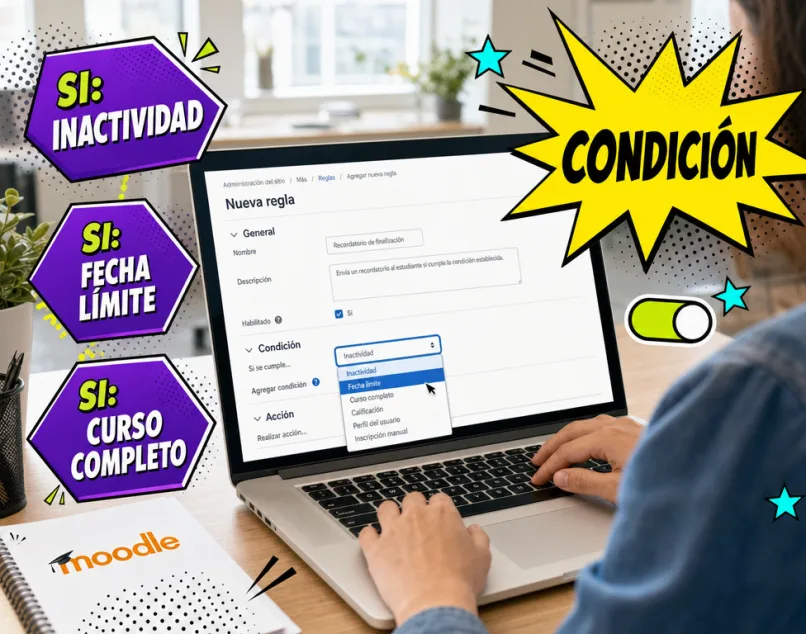
Define the condition
Pick the trigger from a menu: days of inactivity, course completed, grade reached, upcoming due date, or group membership. Combine several conditions in a single rule to fine-tune exactly when the agent should act.
Write the message and choose the actions
Write the message template with the student's data and choose who receives it. Add what else should happen: enroll in the next course, assign refresher activities, or issue the signed certificate.

Turn it on and forget it
The rule runs 24/7 with an auditable log: what it did, when, and to whom. Pause it, edit it, or test it in simulation mode. Your admin gets hours back every week — and the forgetting disappears.

The notifications agent powers the other plugins: it moves learners along their Moodle learning paths automatically and hands out points and coins from avatar gamification when goals are met. And if your operation needs a rule or action that doesn't exist yet, we build it with our custom Moodle plugin development.
What we see when rules go live in real operations with hundreds or thousands of users.
Admin hours recovered per week
Reminders, enrollments, and certificates that used to be manual work now run on their own.
Repetitive tasks covered by rules
If it is repetitive and has a clear condition, it can be automated — and it stays in an auditable log.
Platform Admin
"Automatic rules eliminated hours of admin work every week."
Corporate University
"Onboarding enrolls itself when someone is added: zero misses."
Talent Manager
"Certificates go out the moment people pass, signed and instant. People notice."

IT Lead
"The rules log saved us in an audit: everything traceable, date by date."

Compliance Coordinator
"Expiration notices put an end to lapsed certifications."

Moodle Administrator
"Support comes from the people who built the plugin: no runaround with generic help desks."
Book a demo and we'll build a rule from your operation live — with your courses, your students, and your real cases. To start with the full picture, request the free LMS assessment.