


More industrial simulators
For warehouses, the forklift simulator; for brigades, the fire extinguisher and evacuation simulator; for machinery, the 3D engine manipulator.

Platforms
Course production
Online course production
From content to SCORM, in your city
Instructional design for courses
Objectives, script and storyboard
Course content design
Writing, scripts and graphic design
Gamified courses
End-to-end SCORM production
Interactive videos
Decisions and assessment in video
Learning objects
Interactive micro-content
Moodle Plugins
Artificial intelligence
ISO 9001 — Quality
ISO 14001 — Environmental
ISO 45001 — Safety
ISO services
Formats
Learn
A 360° LOTO simulator that runs in your browser: you are in the electrical room, the conveyor needs maintenance and you must notify, shut down, isolate, lock, tag and verify zero energy, in that order. An out-of-sequence step is recorded as an error. This is how maintenance technicians and authorized employees train in hazardous energy control before touching a real panel.
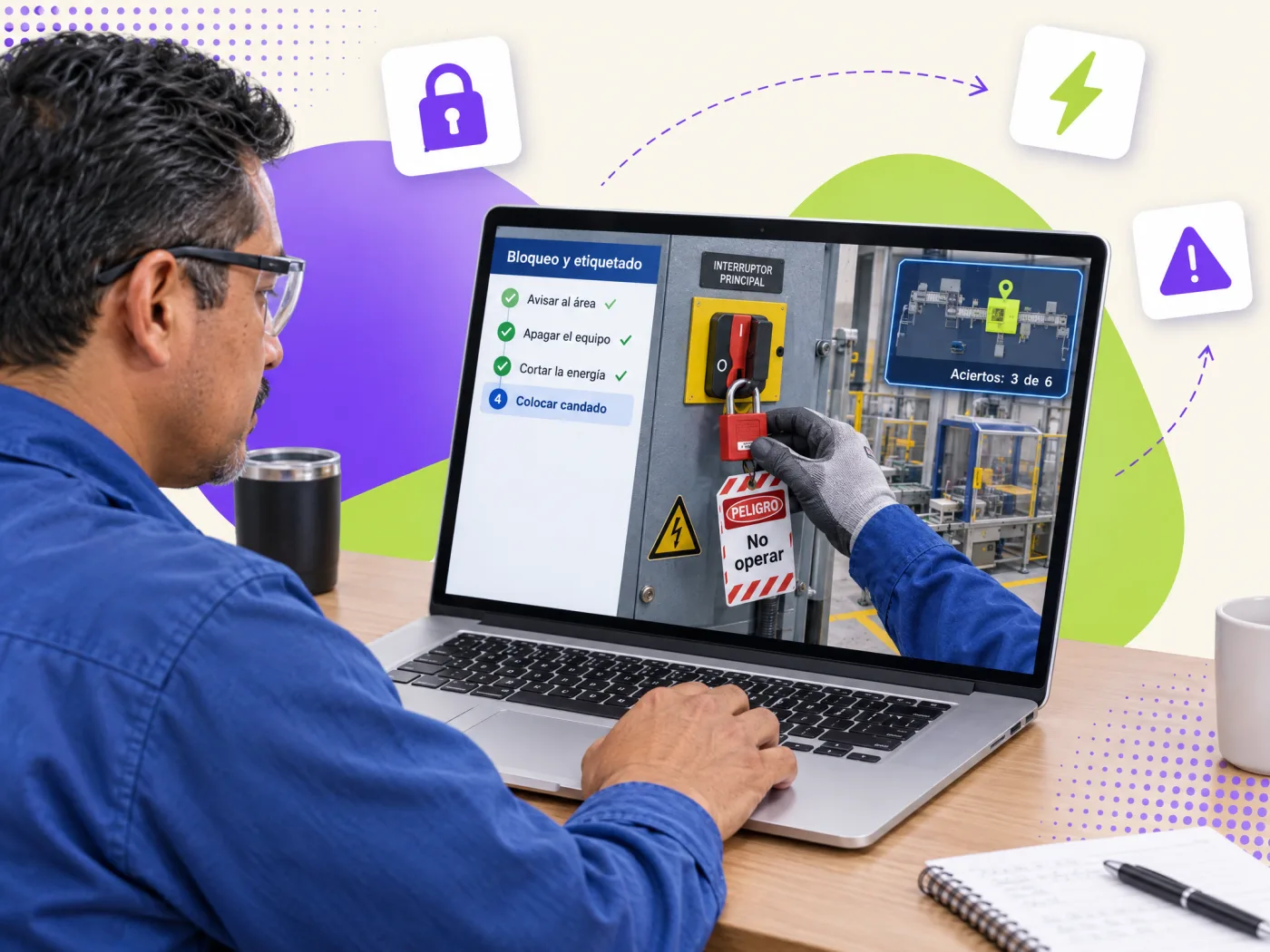
One 360° scene of the electrical room, the six LOTO steps in strict sequence, verification with a tester and the lockout-removal decision.
It is an interactive scenario where a technician practices the hazardous energy control procedure (lockout-tagout, LOTO) on real equipment photographed in 360°: notify affected employees, shut down with the normal control, isolate the energy source, apply a personal lock, attach a tag and verify zero energy before working. Unlike a classroom course, the simulator enforces the order: if the person tries to lock before isolating or verify before locking, the mistake is explained and recorded, as an audit would. It prepares authorized employees for supervised practice on real equipment and leaves evidence per technician.
The hazardous energy control sequence, with the rules most often broken in real life.
Tell the operator and area supervisor before de-energizing. A conveyor that "will not start" without warning gets forced.
Stop from the pendant, not the disconnect, to avoid opening under load or arcing.
Main disconnect to OFF and isolation of other energies: pneumatic, hydraulic, mechanical, thermal.
Personal padlock with a single key for every person involved, with a multi-lock hasp when there are several.
Tag with name, date, time and reason. The tag warns; the lock prevents. Never a tag alone.
Failed start attempt and absence-of-voltage test on all three phases, with the tester checked before and after.
Because accidental-energization injuries come from sequence omissions, not lack of theory: locking without verifying, verifying without testing the tester, removing someone else's lock "because they finished". The simulator forces the six steps in order and puts the person in front of the hardest decision in the procedure: removing the lockout when a coworker is missing. Every technician leaves evidence (sequence, errors, decision, time) useful for authorizing staff and for safety audits, and the annual refresher happens without stopping the equipment.
The procedure follows OSHA 29 CFR 1910.147 (control of hazardous energy) and NFPA 70E (absence-of-voltage verification), and in Mexico NOM-004-STPS-1999 and NOM-029-STPS-2011. We adapt the steps to your written procedure, your equipment (panels, valves, presses, conveyors) and your forced-removal policy.
We photograph your electrical rooms and critical equipment in 360°, load your machine-specific procedure (isolation points, lockout devices, verification method) and add your forced-removal and shift-change scenarios. Delivered as a SCORM or xAPI package for your LMS and as training evidence for authorized employees.
Evidence for authorizing staff and for audits.
Whether they executed the six steps in order or tried to skip one.
Every attempt to lock before isolating or verify before locking, with its explanation.
Whether they completed the start test and the tester measurement.
What they did about the absent coworker's lock: wait, cut or remove their own.
Whether they checked PPE, signage and the lockout station before starting.
Every action as an "actor-verb-object" statement for your LMS's LRS.
Quote the scenario with your equipment photographed in 360°. Three scope options with a closed price.
Practice on real equipment is still required; the simulator guarantees the technician arrives with the sequence learned.
| Traditional course | Course with Geedle simulator | |
|---|---|---|
| Six-step sequence | Explained with slides | Executed in order on the 360° equipment, with recorded errors |
| Zero-energy verification | Mentioned | Practiced: failed start and tester |
| Lockout removal | Discussed | Decided on a real case and evaluated |
| Evidence per technician | Test and attendance | Sequence, errors, decision and time (SCORM/xAPI) |
| Annual refresher | Another full course with equipment stopped | Simulator refresher without stopping production |
Five phases with a deliverable you approve in each one.
360° photos and video of the area, the current procedure and an interview with the expert.
Deliverable: technical scriptTarget behavior, critical decisions, frequent mistakes and the feedback for each one.
Deliverable: storyboard and decision treePanoramas with hotspots, or the machine modeled when its movement must be simulated.
Deliverable: navigable scenarioSteps, interlocks, checklist, score and the xAPI events that will reach your LMS.
Deliverable: working simulatorSCORM or xAPI tested on your platform and a pilot with real staff before launch.
Deliverable: published package and reportFor warehouses, the forklift simulator; for brigades, the fire extinguisher and evacuation simulator; for machinery, the 3D engine manipulator.
The simulator feeds your management system: see ISO 45001 consulting and corporate training.
See the full catalog at training simulators and 360° virtual tours.
Every scenario runs in the browser and is delivered as SCORM or xAPI.
Tell us how many authorized technicians you have, which equipment and which procedure you use. We reply the same day.