


More safety simulators
The forklift is one of eight scenarios in the catalog. See also the lockout-tagout simulator, the fire extinguisher and evacuation simulator and the 3D engine manipulator.

Platforms
Course production
Online course production
From content to SCORM, in your city
Instructional design for courses
Objectives, script and storyboard
Course content design
Writing, scripts and graphic design
Gamified courses
End-to-end SCORM production
Interactive videos
Decisions and assessment in video
Learning objects
Interactive micro-content
Moodle Plugins
Artificial intelligence
ISO 9001 — Quality
ISO 14001 — Environmental
ISO 45001 — Safety
ISO services
Formats
Learn
A virtual forklift simulator that runs in your browser: do the pre-use inspection, drive through the warehouse from the operator's seat, decide at the intersection and the loading dock, and get feedback on every step. This is how forklift operators train before climbing on the real truck.
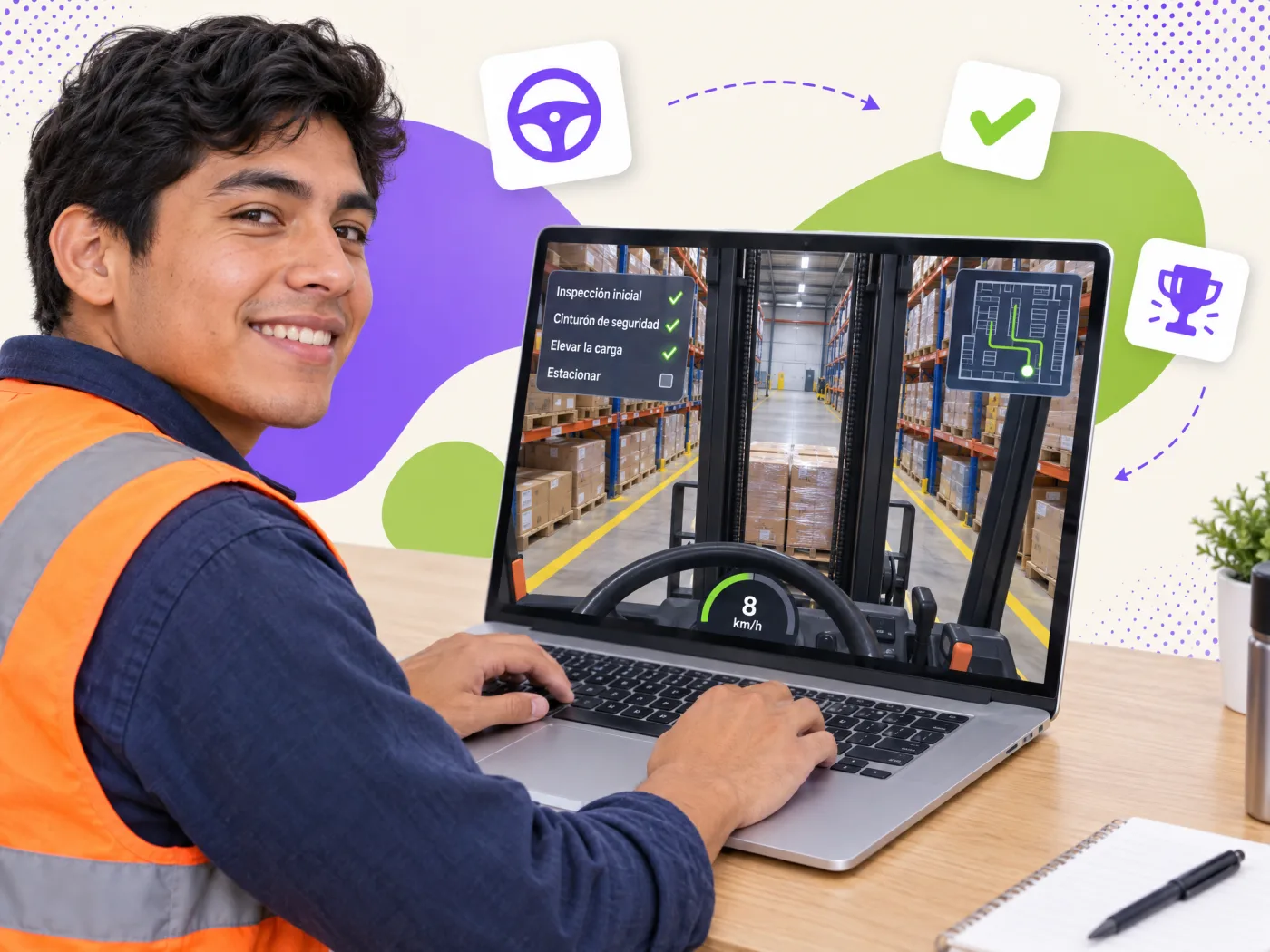
Real first-person driving: a steering wheel that turns, accelerator, reverse, brake, forks and horn, with engine, backup-alarm and hydraulic sounds. Eight mission steps and an xAPI-style log.
A forklift simulator is a virtual scenario where the operator practices the pre-use inspection, warehouse traffic and load handling with no risk to people or equipment. In this 3D version the learner really drives from the operator's seat: turns the wheel, accelerates, brakes, reverses with the backup alarm, raises and lowers the forks and sounds the horn, with an engine sound that responds to the throttle. They pick up the pallet at rack A, stop at the convex-mirror intersection, carry the load low to dock B and park; collisions, the pedestrian walkway and a raised load count as errors. Every correct decision advances the mission; every mistake is explained and recorded. It is the ideal complement to a certified forklift course: theory gets practiced before the hands-on evaluation on the real truck.
The mission follows the real order of a shift: inspection, driving, dock and parking.
Forks, mast, chains, seat belt, horn, lights and backup alarm. If anything fails, the truck does not leave: the simulator enforces the right order.
Full stop, horn and mirror check before every intersection; walking speed and low load with the mast tilted back.
Pedestrian zone, dock crossing and absolute pedestrian priority: the decisions that prevent the most incidents.
Dock light or dock lock, chocked trailer, tractor brake and dock leveler before entering the trailer.
Pallets in good condition, centered load, height and floor capacity, and never in front of emergency exits or extinguishers.
Forks on the floor, mast vertical, parking brake, engine off and key removed.
Because forklift accidents happen in seconds and almost always come down to decisions: not stopping at an intersection, traveling with the load raised, entering an unchocked trailer. A classroom course explains the rule; the simulator forces the learner to apply it and shows the consequence of the mistake without anyone getting hurt. It also generates evidence per person (sequence, errors, attempts, time) for the practical evaluation and for safety audits. In companies with high turnover, the simulator standardizes onboarding: every new operator goes through the same scenario before touching the equipment.
Mexico's NOM-006-STPS-2014 (materials handling and storage) and OSHA 1910.178 in the US require operators of powered industrial trucks to be trained and evaluated, and require the workplace to have safe operating procedures including a pre-use inspection. Our simulator follows that logic: pre-use inspection, traffic rules, dock loading and parking. It does not replace the hands-on evaluation on the real truck; it prepares and documents it.
We take 360° photos of your aisles, docks and stacking areas, load your rules (speeds, signage, dock lights, rack capacities) and your own frequent mistakes, and deliver it as a SCORM or xAPI package for your LMS. We can include the truck model you use (counterbalance, reach truck, pallet jack) and different routes per role. If you have no LMS, we implement one too.
Data a written test cannot give you and your supervisor does need.
Whether they checked forks and cab before moving the truck, and in which order.
Which option they chose at the intersection, facing the raised load and when stacking, and how many times they got it wrong.
Which information they reviewed (mirror, extinguisher, pedestrian zone, racks) and which they ignored.
Every attempt to do a step too early is recorded as an error with its explanation.
How long the simulated shift took and where they paused the longest.
Every action as an "actor-verb-object" statement ready for your LMS's LRS.
Request a quote: we propose three scopes with a closed price, from a 360° tour of your warehouse to a simulator with your forklift model.
What changes when practice comes before the evaluation on the real truck.
| Traditional course | Course with Geedle simulator | |
|---|---|---|
| Pre-use inspection | Explained in class | Practiced step by step, in order, with explained mistakes |
| Decisions at intersections and docks | Mentioned | Made and evaluated, with simulated consequences |
| Evidence per operator | Written test and attendance list | Sequence, errors, attempts and time (SCORM/xAPI) |
| Real truck | Used to teach and to evaluate | Reserved for the final hands-on evaluation |
| New operators | Depend on the available instructor | Same scenario for everyone, from day one |
Five phases with a deliverable you approve in each one.
360° photos and video of the area, the current procedure and an interview with the expert.
Deliverable: technical scriptTarget behavior, critical decisions, frequent mistakes and the feedback for each one.
Deliverable: storyboard and decision treePanoramas with hotspots, or the machine modeled when its movement must be simulated.
Deliverable: navigable scenarioSteps, interlocks, checklist, score and the xAPI events that will reach your LMS.
Deliverable: working simulatorSCORM or xAPI tested on your platform and a pilot with real staff before launch.
Deliverable: published package and reportThe forklift is one of eight scenarios in the catalog. See also the lockout-tagout simulator, the fire extinguisher and evacuation simulator and the 3D engine manipulator.
The simulator prepares the hands-on evaluation; your company issues the certificate. See our corporate training and gamified scenarios for industrial safety.
See the full catalog at training simulators and 360° virtual tours, with demos you can try today.
Every scenario runs in the browser and is delivered as SCORM or xAPI.
Tell us how many operators you have, which trucks they use and which LMS you run. We reply the same day.